
Cycle Count
The Cycle Count page shows all cycle counts currently available in the system. Use this page to review counts, view suspect containers, export grid data, and close completed cycle counts.
Where to Find Cycle Counts
Virtual Ops System location:
Inventory > Cycle Count
How to Use the Cycle Count Grid
- Review available cycle counts
The grid lists all cycle counts currently available in the system.
- Sort the grid
Click column titles to sort entries. Additional grid sorting help is available from the related help link.
- Search or filter results
Use the search function or additional filter options to narrow the displayed cycle count entries.
- Choose an action
Use the available action buttons to view containers, review suspect locations, export grid data, or close a cycle count.
Closing a cycle count marks it as completed and makes all inventory changes permanent.
Grid Action Buttons
View
View the containers that have been added to the cycle count.
View Suspect
View containers that do not have a location assigned in the system.
Export
Export the currently displayed grid data to Excel.
Close Cycle Count
Mark the cycle count as completed and make all inventory changes permanent.
Status Types
- All — Lists all cycle counts.
- In-Progress — Lists all cycle counts that have not been completed.
- Finalized — Lists all cycle counts that have been completed.
View Suspect Locations
The View Suspect grid lists containers that do not have a location assigned in the system. These entries can be sorted by clicking column titles, using the search function, or filtering by additional options.
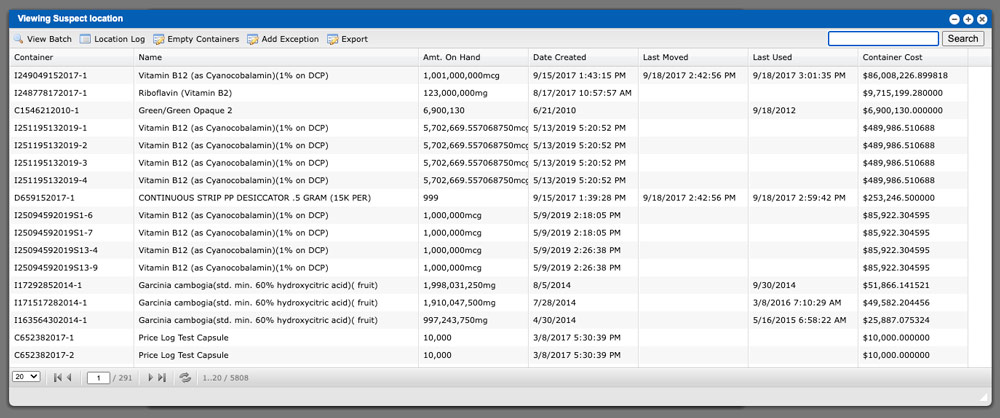
Suspect Location Actions
View Batch
View details about the batch.
Location Log
Show a list of locations that the container has been moved to.
Empty Containers
Set the container count to zero. If all containers for the batch are zero, the batch will automatically be closed.
Add Exception
Add an exception to a container.
Export
Export the currently displayed grid data to Excel.